Hey everyone! If you’re like me, you love using social media to stay connected, but sometimes managing multiple platforms can be a bit overwhelming. Today, I’m going to show you how to make things easier by posting on Instagram and Threads at the same time. Trust me, it’s a game changer!
Why Post on Both Platforms?
First off, why should you even bother posting on both Instagram and Threads simultaneously? Here are a few good reasons:
- Save Time: You only need to create and share your content once.
- Stay Consistent: Your message remains the same across both platforms.
- Reach More People: Different audiences hang out on different apps, so why not reach them all?
Getting Ready
Before we dive in, let’s make sure everything is set up correctly:
- Link Your Accounts: Make sure your Instagram and Threads accounts are connected. You can do this in the settings of each app.
- Update Your Apps: Ensure you have the latest versions of both Instagram and Threads installed. This way, you have all the latest features.
Step-by-Step Guide
Step 1: Create Your Content
First things first, decide what you want to share. It could be a cool photo, a fun video, or even a carousel of images. Make sure it’s something that represents you well!
Step 2: Open Instagram
- Launch the App: Open Instagram on your phone.
- Create a New Post: Tap the “+” button at the bottom center of your screen.
- Select Your Media: Choose the photo or video from your gallery, or take a new one.
- Edit Your Post: Add some filters, crop if needed, and write a catchy caption. Don’t forget to tag people and add a location if you want!
Step 3: Share on Threads Too
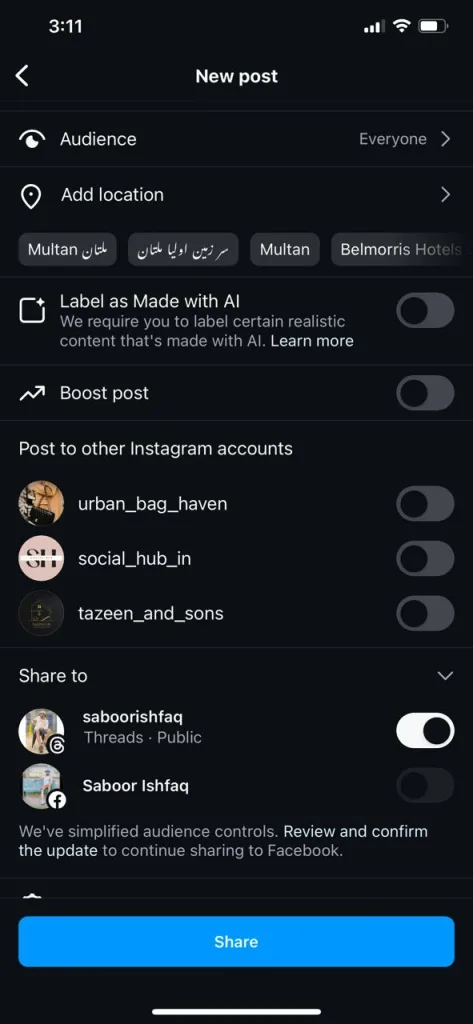
- Find the Sharing Options: Before you hit that “Share” button, look for the option to share on other accounts.
- Toggle Threads: Make sure Threads is selected. You might find this under the “Share to” section.
Step 4: Post It!
- Hit Share: Tap “Share,” and voilà! Your post will go live on both Instagram and Threads.
Tips for Success
- Customize Captions: Even though you’re sharing the same photo or video, you can tweak your captions a bit. Instagram can be more general, while Threads can have a more personal touch.
- Engage with Your Audience: Check both platforms for comments and messages. Respond to them to keep your followers engaged.
- Check Your Analytics: Use Instagram’s analytics to see how your post is performing. This helps you understand what your audience loves.
Drawback Of Posting On Instagram and Threads at Same Time
One drawback which our research team analysed for posting on threads automatically from Instagram, was that those posts, that were shared on Threads App directly from Instagram without opening the threads app individually didn’t get much engagement. We found a big difference in the engagement rate of both the posts that were posted from Instagram and those that were posted by visiting the Threads App, This might be due to threads Algorithm, as every App demands for screen time, What If you directly post from Instagram? the Threads App will lack It’s screentime. So it states that the algorithm like it more when you to visit the Threads App and then post.
FAQs
1. Can I schedule posts to go live on both Instagram and Threads simultaneously?
Yes, you can schedule posts using third-party social media management tools like Hootsuite or Buffer. These tools often support scheduling for multiple platforms, including Instagram and Threads, allowing you to plan your posts in advance.
2. Do I need a Threads account to use this feature on Instagram?
Yes, you need to have a Threads account and it must be linked to your Instagram account. This connection allows you to share posts on both platforms at the same time.
3. What type of content can be posted simultaneously on Instagram and Threads?
You can post photos, videos, and carousel posts (multiple images or videos) on both platforms. However, certain features like Instagram Stories or IGTV may not automatically post to Threads.
4. How do I know if my post was successfully shared on both platforms?
After sharing, you can check your Threads and Instagram accounts to see if the post appears on both. Notifications from each app will also confirm successful posting.
5. Can I edit a post after it has been shared on both platforms?
You can edit the post on Instagram after it has been shared. However, you may need to manually update or delete the post on Threads if you want the changes to reflect there as well.
6. Are there any differences in how posts appear on Instagram versus Threads?
Yes, posts may appear slightly different due to the unique layouts and features of each platform. For example, Instagram might crop images differently or display video previews in a specific way compared to Threads.
7. Can I post to multiple Threads accounts from a single Instagram account?
Currently, you can only link one Threads account to your Instagram account for simultaneous posting. To post on multiple Threads accounts, you would need to switch accounts or use separate devices.
8. Does posting on both platforms affect the quality of the media?
No, posting on both platforms does not affect the quality of your photos or videos. The content will maintain the same resolution and quality as originally uploaded.
9. What should I do if the Threads option doesn’t appear when I’m posting on Instagram?
First, ensure your Instagram and Threads accounts are linked and both apps are updated to the latest version. If the issue persists, try disconnecting and reconnecting your accounts or reinstalling the apps.
10. Can I use Instagram’s new features like Reels and Guides in simultaneous posting?
As of now, Reels and Guides are specific to Instagram and may not automatically share to Threads. You would need to manually post this type of content on Threads if you want it there as well.
11. Will hashtags used on Instagram also work on Threads?
Hashtags will appear on both platforms, but their effectiveness can vary. Instagram’s algorithm uses hashtags to categorize content, while Threads might not prioritize them in the same way. Experiment with hashtags to see what works best on each platform.
12. How do I manage notifications from both platforms?
You can manage notifications by adjusting the settings in each app. This allows you to control what types of notifications you receive and how frequently, helping you stay on top of engagement without being overwhelmed.
Conclusion
There you have it! By posting on Instagram and Threads at the same time, you save time, keep your messaging consistent, and reach more people. Give it a try and see how it works for you. Always feel free to leave us a comment when needed, Happy posting!
Also Read:
why-i-cant-see-comments-on-threads-problem-solved
toggle-off-threads-posts-visible-on-instagram-fb
new-threads-app-a-instagram-app-threads-vs-twitter/
About The Author

Position: Team Lead (Content Writers).
Saboor has been employed as editors head at Socialhubin for years, authoring articles centered around new discoveries, latest news, and advance methods to learn. Additionally, he pens articles pertaining to Instagram, Facebook, TikTok, Snapchat, and Twitter. Almost all social media Platforms, During his leisure time, Saboor delights in reading, traveling, and researching new features In social media.